
Outreach labs with limited IT capacity don’t need to build every EHR connection in-house. A managed HL7 integration partner handles connectivity, mapping, monitoring, and project management as the provider network grows. Lifepoint Informatics delivers that infrastructure, with 500+ supported EHR vendors, 20,000+ established interfaces, and 24/7 support.
HL7 Interface Solution for an Outreach Laboratory
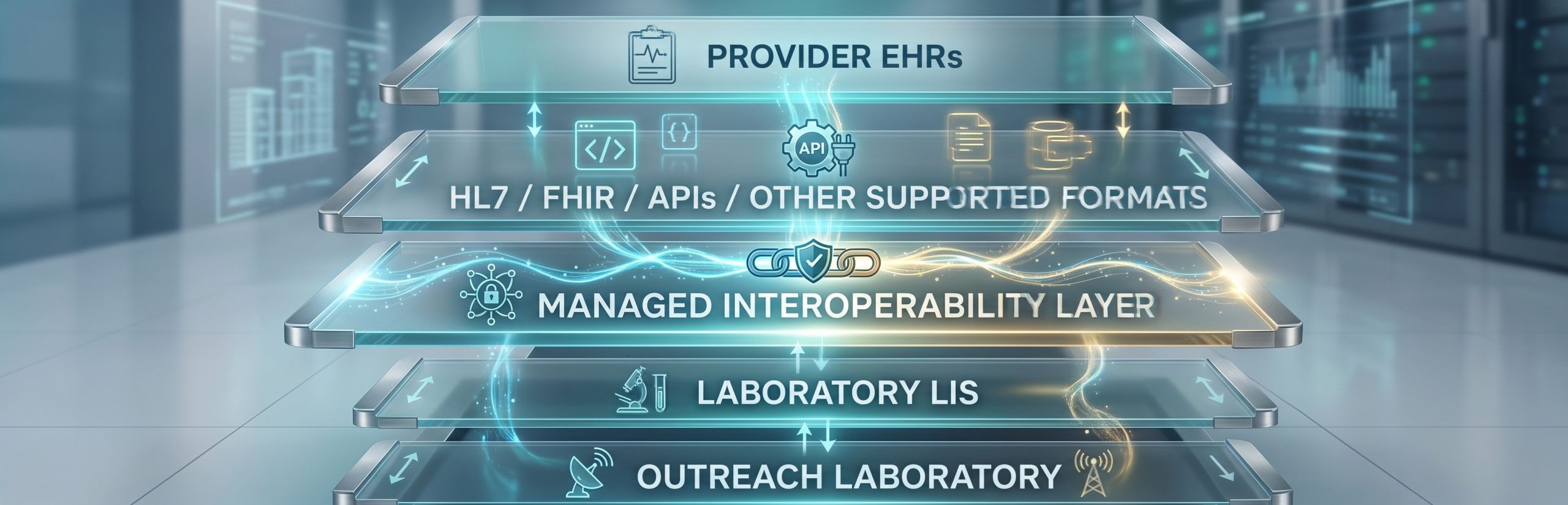
An HL7 interface solution is the technology and service layer that enables a laboratory to exchange clinical information with external healthcare systems. For outreach labs, this typically means connecting a LIS with the EMR or EHR systems used by referring providers.
The integration layer handles connectivity, message translation, data mapping, routing, monitoring, alerts, and ongoing interface management. It doesn’t replace the LIS or the provider EHR; it connects them.
Why Limited Internal Interface Capacity Becomes an Outreach Challenge
Outreach laboratories often need to connect with many provider organizations, and those organizations may use different EHR vendors, versions, configurations, data formats, test codes, and connectivity methods. As the network grows, interface work starts competing with other internal IT priorities.
Common demands include scoping new provider connections, coordinating with EHR and LIS vendors, establishing secure connectivity, mapping tests and insurance data, testing orders and results, validating workflows before go-live, monitoring interfaces post-launch, and investigating failed messages. A lab with limited interface capacity should therefore evaluate more than just an interface engine; it should evaluate how much of the integration lifecycle a vendor can actually manage.
What Outreach Labs Need in a Managed HL7 Interface Solution
1. Centralized Hub Architecture
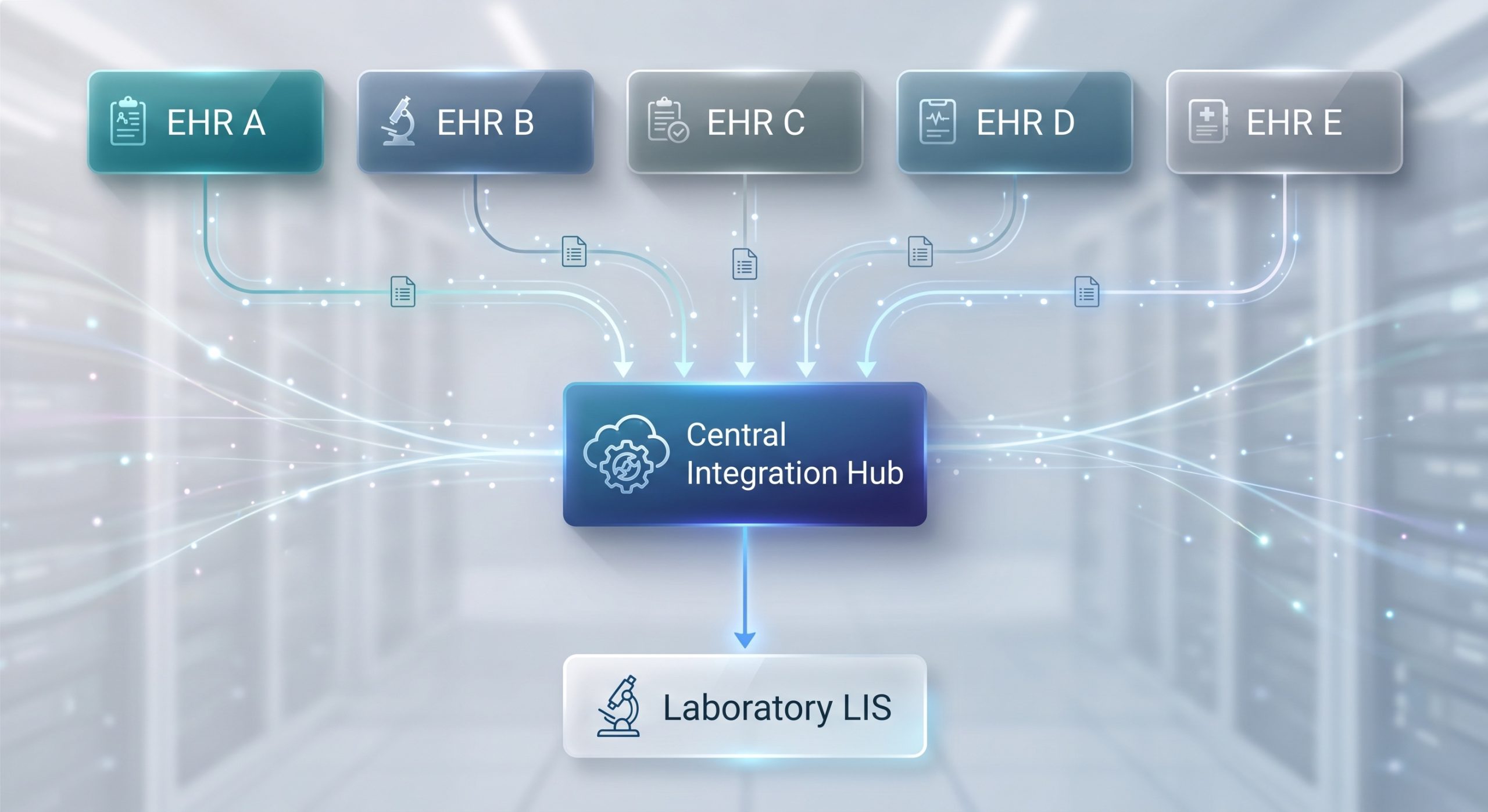
A hub-based model creates a centralized interoperability layer between the laboratory and external provider systems. Instead of treating every provider connection as an isolated project, the lab uses a common framework for connectivity, mapping, routing, and monitoring. That said, each new endpoint may still require its own discovery, configuration, mapping, testing, and coordination; the benefit is a more organized operating model as the outreach network expands.
2. Experience Across Multiple EHR Environments
Outreach labs rarely serve a provider community that all use the same EHR. A managed integration partner should be able to explain which EHR vendors it supports, which interface patterns already exist, and what’s required when a new provider connection is added. Lifepoint Informatics currently supports more than 500 EHR vendors and has more than 20,000 established interfaces.
3. HL7, FHIR, and Multiple Data Formats
HL7 remains the standard for most laboratory orders and results exchange. FHIR is an HL7 standard built around modern web technologies and APIs. Depending on the systems involved, an outreach integration environment may also need to support JSON, CCDA, CCD, EDI, XML, or other formats. The key question isn’t which vendor lists the most acronyms; it’s whether the integration partner can support the formats and workflows your specific systems require.
4. Data Mapping and Translation
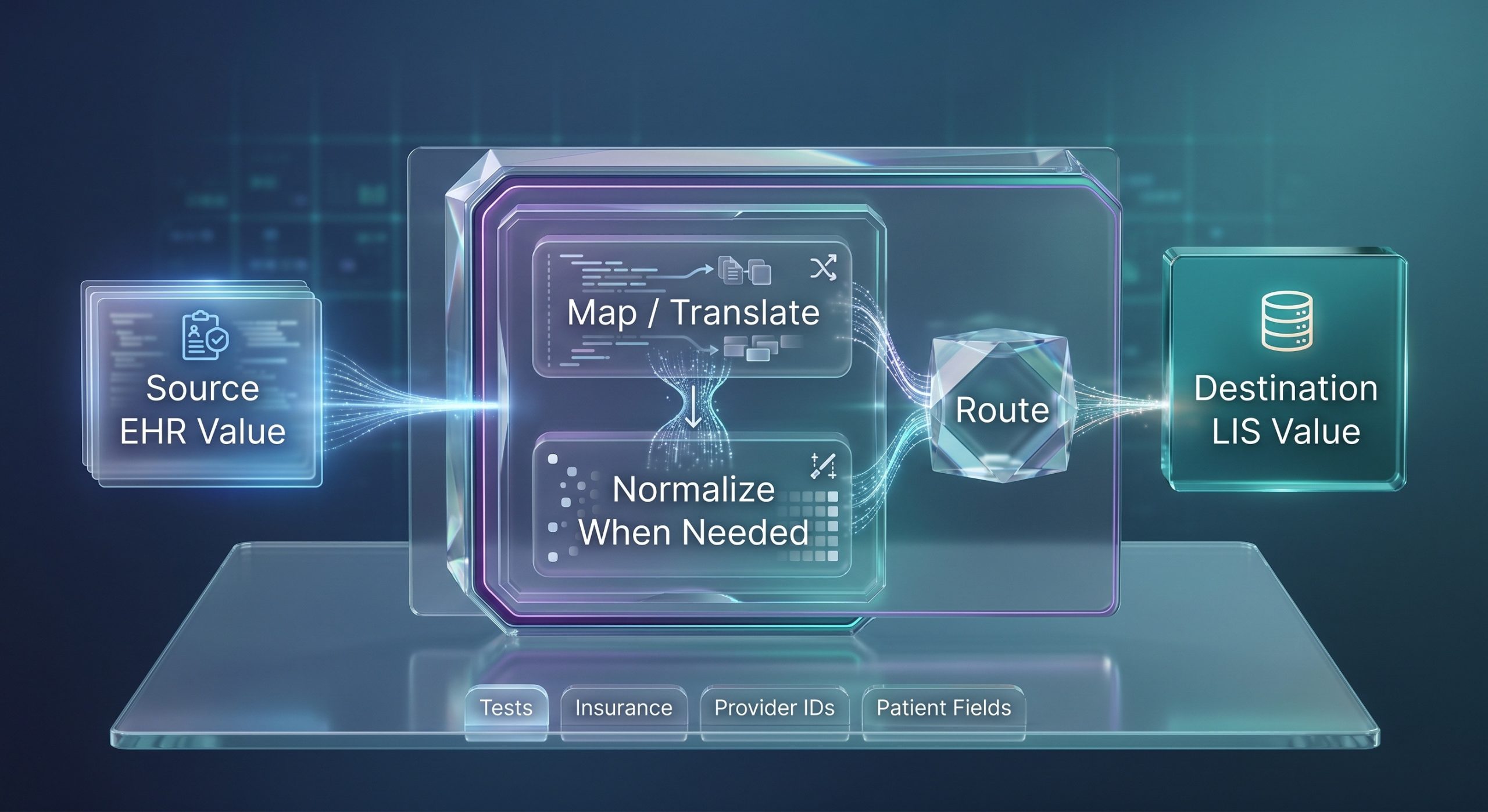
Different systems often use different codes or field structures for the same information. Mapping creates the relationship between those values so data can move between systems in a usable form. This can apply to tests, insurance information, provider identifiers, patient fields, and other interface data. Labs should ask who builds the mappings, who maintains them, how changes are tested, and how exceptions are surfaced.
5. Interface Monitoring and Alerts
An interface shouldn’t become a black box after go-live. Labs need visibility into interface status and a clear process for identifying and resolving problems. Useful capabilities include an interface dashboard, message auditing, volume monitoring, configurable alerts, and documented escalation procedures. Lifepoint provides a real-time interface dashboard, audit tracking, volume monitoring, alerts, and 24/7 monitoring and support.
6. Project Management and Implementation Support
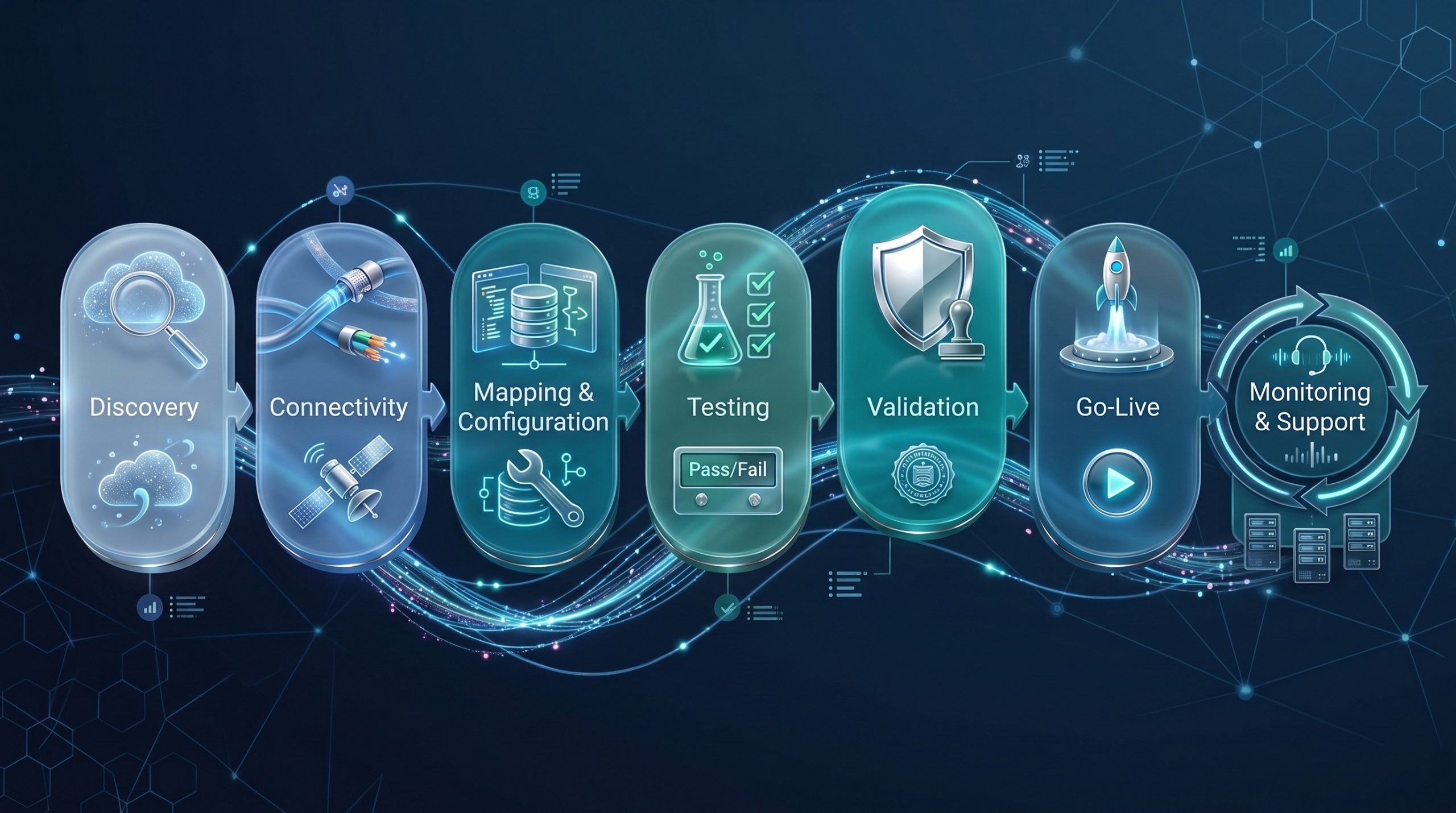
For labs with limited internal interface capacity, project management can be as important as the software itself. A managed partner should be able to coordinate work across the laboratory, LIS vendor, provider organization, and EHR vendor. From discovery and connectivity through mapping, testing, validation, go-live, and ongoing support. Implementation timelines vary based on systems, endpoints, workflow requirements, and available resources, so be cautious of any vendor that promises every interface will launch in a fixed number of days.
How Managed HL7 Integration Can Reduce Internal IT Burden
A managed integration model shifts most interface work to a specialized external team, freeing internal IT staff to focus on core infrastructure while still participating where their systems or security requirements demand it. The realistic goal isn’t zero internal involvement; it’s a clearer division of responsibilities between the lab’s team and the managed partner.
| Responsibility | Internal Lab / IT | Managed Integration Partner |
|---|---|---|
| LIS access and internal requirements | Provides required system access, contacts, and internal approvals | Coordinates integration requirements with laboratory team |
| External EHR coordination | Participates as needed | Can lead technical coordination with external parties |
| Mapping and interface configuration | Reviews/validates laboratory requirements | Builds and maintains supported interface configuration |
| Testing and validation | Validates laboratory workflow and expected outcomes | Coordinates and supports interface testing |
| Monitoring | Reviews issues and business impact | Monitors supported interfaces and provides alerts/support |
Point-to-Point Interfaces vs. a Managed Hub
Point-to-point integration creates individual, direct connections between systems. As the outreach network grows, each new provider requires its own separate connection, which can become increasingly difficult to manage.
| Consideration | Point-to-Point Approach | Managed Hub Approach |
|---|---|---|
| Architecture | Individual connections between systems | Centralized integration layer |
| Mapping | Often managed per interface | Can be managed through centralized mapping tools |
| Monitoring | May be distributed across connections | Can be centralized through a dashboard and alerts |
| New endpoints | Additional direct connection and coordination | Added through a repeatable hub-based process |
| Internal staffing | Depends heavily on internal interface resources | More implementation and maintenance work can be handled by partner |
| Scalability | Complexity can grow as connections multiply | Designed to organize connectivity across multiple endpoints |
A managed hub centralizes that complexity. Connectivity, mapping, and monitoring run through a single integration layer. New endpoints are added through a repeatable process rather than from scratch each time. Neither approach eliminates implementation, testing, maintenance, or governance; the difference is how the work is organized and who carries it.
Electronic Orders and Results: The Core Outreach Workflow
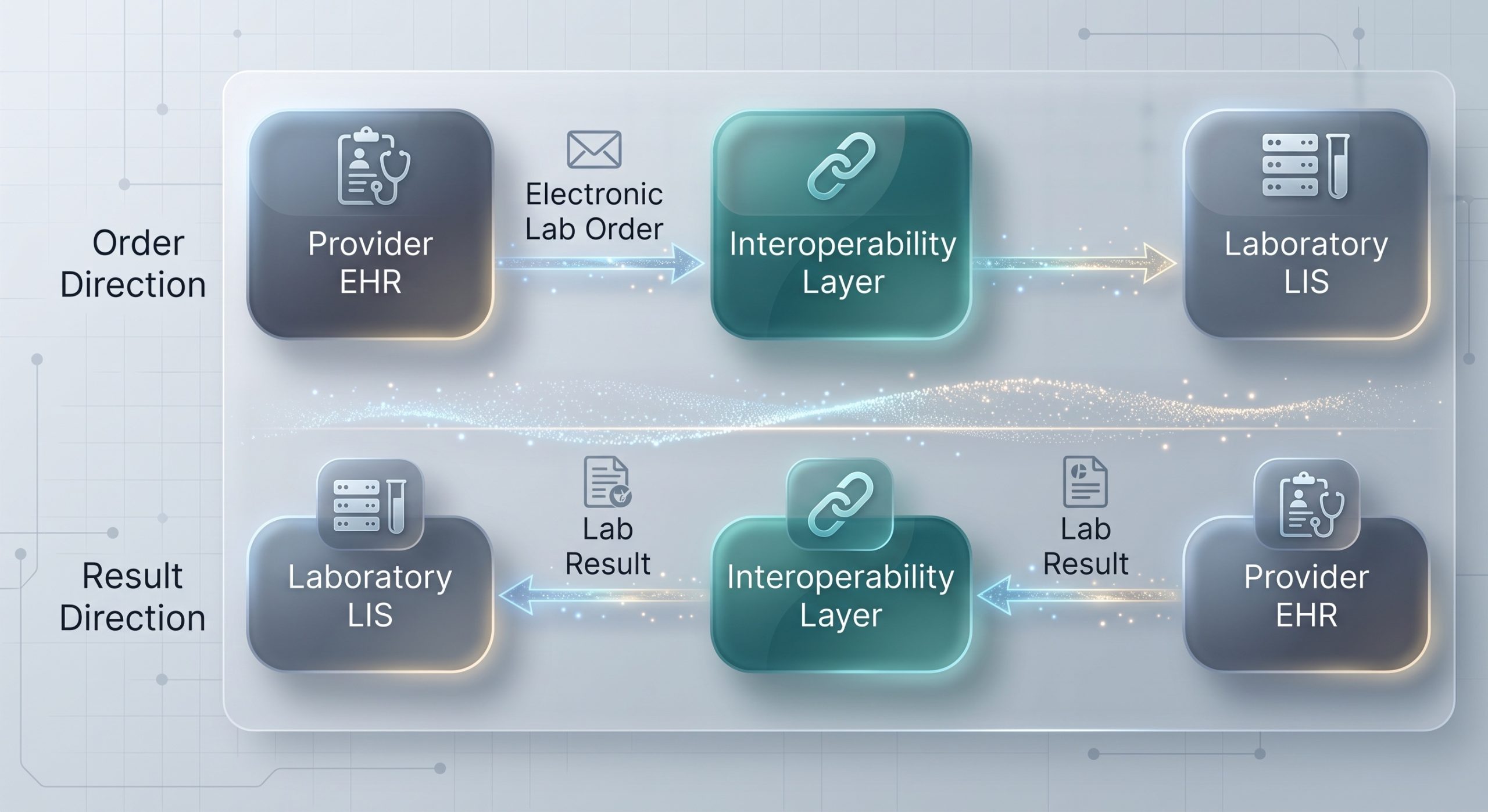
The fundamental outreach integration workflow is bidirectional: electronic lab orders flow from the provider EHR through the interoperability layer to the LIS, and lab results flow back through that same layer to the provider. A bidirectional interface supports both directions; a unidirectional interface may support only one, such as result delivery alone. The appropriate model depends on the provider and laboratory workflow.
Supporting Providers Without a Direct EHR Interface
Direct EHR integration isn’t the only way to support an outreach provider. A broader connectivity strategy may include a provider portal and other result-delivery options alongside direct interfaces. Lifepoint’s Provider Web Portal, for example, provides browser-based access to supported laboratory workflows for providers who aren’t connected via direct EHR integration.
How to Evaluate Interface Monitoring
During a vendor demo, ask to see the monitoring workflow rather than accepting a general statement that interfaces are monitored. Specifically, ask them to show you the interface dashboard, demonstrate how message status is displayed, walk through how a failed transaction is identified, explain how alerts are configured and who receives them, describe how interface exceptions are investigated, and outline support coverage and escalation paths.
How to Evaluate Mapping and Compendium Management
Test compendia and code mappings change over time. Labs should understand how the integration partner handles those changes and how they affect connected provider systems. Key questions include who owns the source and destination test dictionaries, how new tests are added, how discontinued tests are handled, whether mappings can be reviewed through a web-based tool, how mapping changes are tested before production, and how unmapped values are surfaced for review.
HL7 vs. FHIR for Laboratory Outreach
HL7 and FHIR aren’t an either-or choice. HL7 v2 remains the most common standard for laboratory orders and results, while FHIR supports newer API-based exchange where systems allow it. A capable integration hub works with both.
| Technology | What It Is | Role in Outreach Integration |
|---|---|---|
| HL7 v2 | Widely used healthcare messaging standard | Commonly used for laboratory orders, results, and other clinical messages |
| FHIR | HL7 standard based on modern web technologies and APIs | Can support API-based healthcare data exchange where systems and workflows support it |
| Integration Hub | Technology/service layer connecting systems | Uses supported standards and formats to map, route, monitor, and manage exchange |
Managed Integration and Interface Errors
No. Managed integration reduces manual work and provides stronger monitoring and support, but no interface environment is error-proof. Source-data problems, mapping issues, patient-matching discrepancies, configuration changes, network interruptions, and endpoint behavior can all create exceptions. The better evaluation question is: how quickly can the platform detect, surface, and support resolution of those exceptions?
HL7 Integration and Laboratory Turnaround Time
Electronic integration can improve the speed and consistency of information exchange, but it shouldn’t be confused with analytical turnaround time. How long testing takes depends on the assay, specimen, laboratory workflow, instrumentation, and staffing. A more defensible benefit is that electronic interfaces can reduce delays associated with manual transcription, disconnected order intake, and manual result distribution for supported workflows.
Security and Governance Questions to Ask
Because laboratory interfaces exchange protected health information, security and governance deserve careful review during vendor selection. Broad statements like “fully HIPAA compliant” aren’t sufficient on their own. Ask how data is protected in transit and at rest, which connectivity methods are supported, how administrative access is controlled, what audit information is available, how vulnerabilities and updates are managed, what business continuity and disaster recovery processes exist, and how responsibilities are divided between the lab, vendor, and connected organizations.
How Lifepoint Informatics Supports IT-Constrained Outreach Laboratories
Since 1999, Lifepoint Informatics has focused on clinical integration, laboratory outreach, and healthcare interoperability. Its hub-based model centralizes mapping, monitoring, alerts, project management, and ongoing support across a growing provider network, backed by 500+ supported EHR vendors, 20,000+ established interfaces, and 24/7 monitoring.
Frequently Asked Questions
What is the best HL7 interface solution for a lab with limited internal IT capacity?
The best fit depends on the laboratory’s LIS, provider network, EHR landscape, internal staffing, security requirements, interface volume, and support model. Laboratories with limited interface resources should strongly evaluate managed solutions that combine integration technology with project management, mapping, monitoring, and ongoing support.
Does an outreach lab need its own HL7 developers?
Not necessarily. A managed integration partner can handle most of the specialized interface work, though the lab’s IT and operational teams will still need to participate in areas like internal system access, security, workflow requirements, testing, and approvals.
Can HL7 and FHIR be used together?
Yes. Healthcare environments can use traditional HL7 messaging and FHIR-based APIs for different workflows depending on the connected systems and use case.
What is a bidirectional lab interface?
A bidirectional interface supports data exchange in both directions, electronic orders moving from the provider EHR to the LIS, and results moving back to the provider.
Does a managed hub replace the LIS?
No. The LIS remains the laboratory’s core system. The integration hub connects the LIS with external provider systems and manages data exchange between them.
How long does an HL7 interface take to implement?
There is no universal timeline. Implementation depends on the LIS, EHR, endpoint, workflow, connectivity, mapping, vendor coordination, testing, validation, and available resources.
Building an Outreach Integration Strategy That Can Scale
For a laboratory with limited internal interface capacity, the goal isn’t to eliminate IT involvement; it’s to build a repeatable model that lets the lab connect new providers without turning every new interface into a custom engineering project. Centralized connectivity, reusable mapping, and managed monitoring make that possible as the network grows.
Contact Lifepoint Informatics to learn how its HL7 Hub and managed interoperability services can support your outreach connectivity while reducing the burden on your internal teams.
