
Hospital outreach labs need more than one connectivity option. The right software connects community providers through EHR interfaces, provider portals, or both, while keeping the hospital LIS at the center. Key things to evaluate: bidirectional ordering and results delivery, data mapping, interface monitoring, exception handling, and whether the platform scales as the provider network grows. Lifepoint Informatics has been doing this since 1999 and supports over 500 EHR vendors across more than 20,000 established interfaces.
What Hospital Laboratory Outreach Software Actually Does
At its core, hospital lab outreach software connects a hospital laboratory to external physicians, group practices, and healthcare organizations for ordering, results delivery, and related workflows. That definition sounds clean. The implementation rarely is.
What falls under that umbrella varies considerably by vendor and by how a given lab has built its outreach program. Electronic ordering, LIS integration, bidirectional EHR connectivity, provider portal access, data mapping, requisition management, interface monitoring, eligibility workflows, and analytics are all part of it. Not every platform handles all of these consistently.
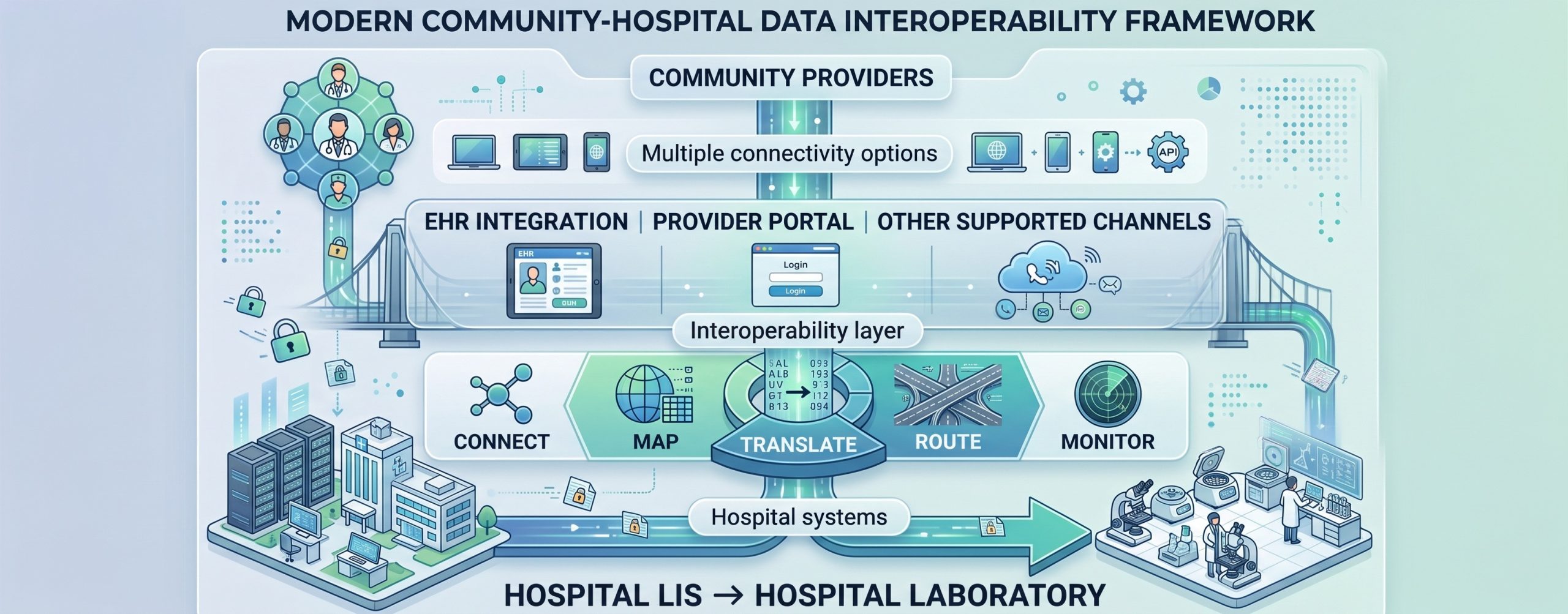
Why a Single Connectivity Channel Doesn’t Hold
A hospital outreach program serving dozens of community practices is dealing with dozens of different clinical environments. Some are running Epic. Some are on a regional EHR most vendors have never heard of. Some still prefer fax for results and aren’t changing that anytime soon.
Forcing every practice into the same workflow creates friction that compounds over time. Onboarding gets harder, not easier. The answer is a connectivity framework that accommodates different provider environments without requiring a separate integration project for each new account.
Electronic Ordering
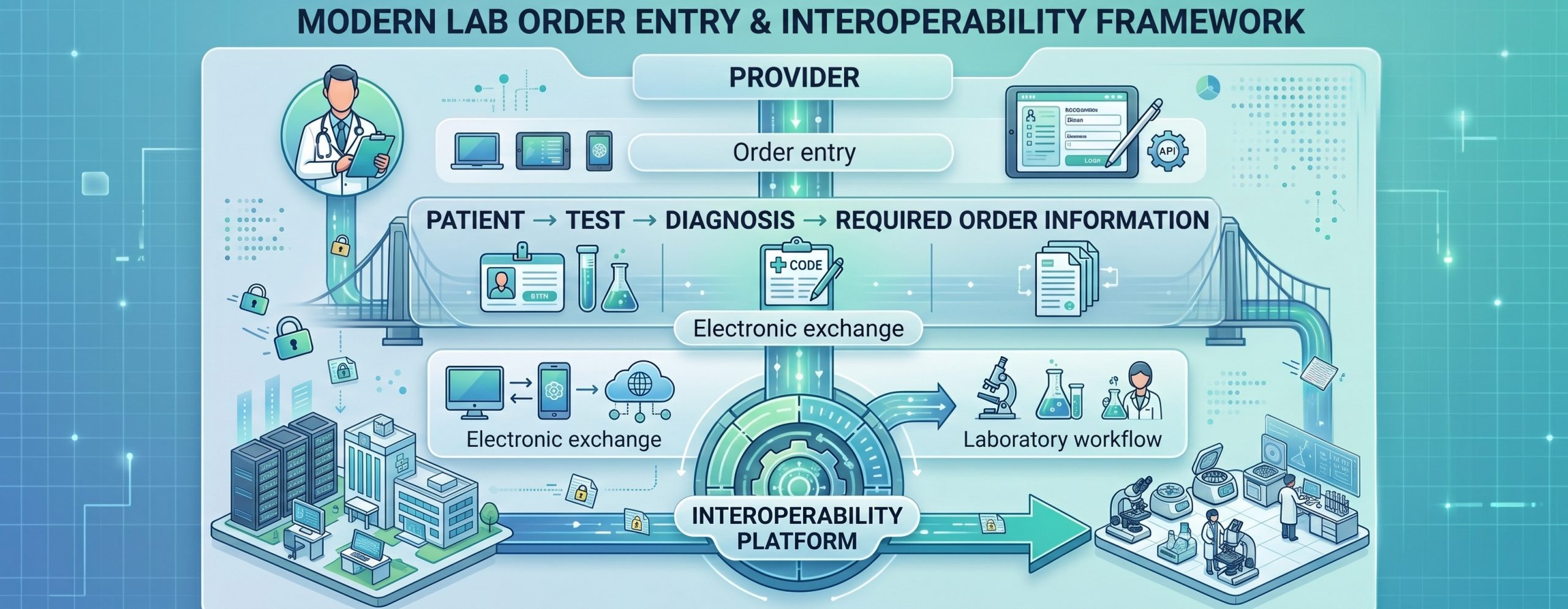
Electronic ordering replaces paper requisitions with structured digital workflows, whether that originates inside a provider’s EHR or through a browser-based portal. It reduces repeated manual transcription and cuts down on order entry errors. But it doesn’t make orders automatically complete.
Evaluating any platform on this point means looking at how it handles required fields, test selection, diagnosis capture, label generation, and downstream delivery to the LIS. The order entry step is visible. What happens after is where most problems show up.
Bidirectional EHR Connectivity
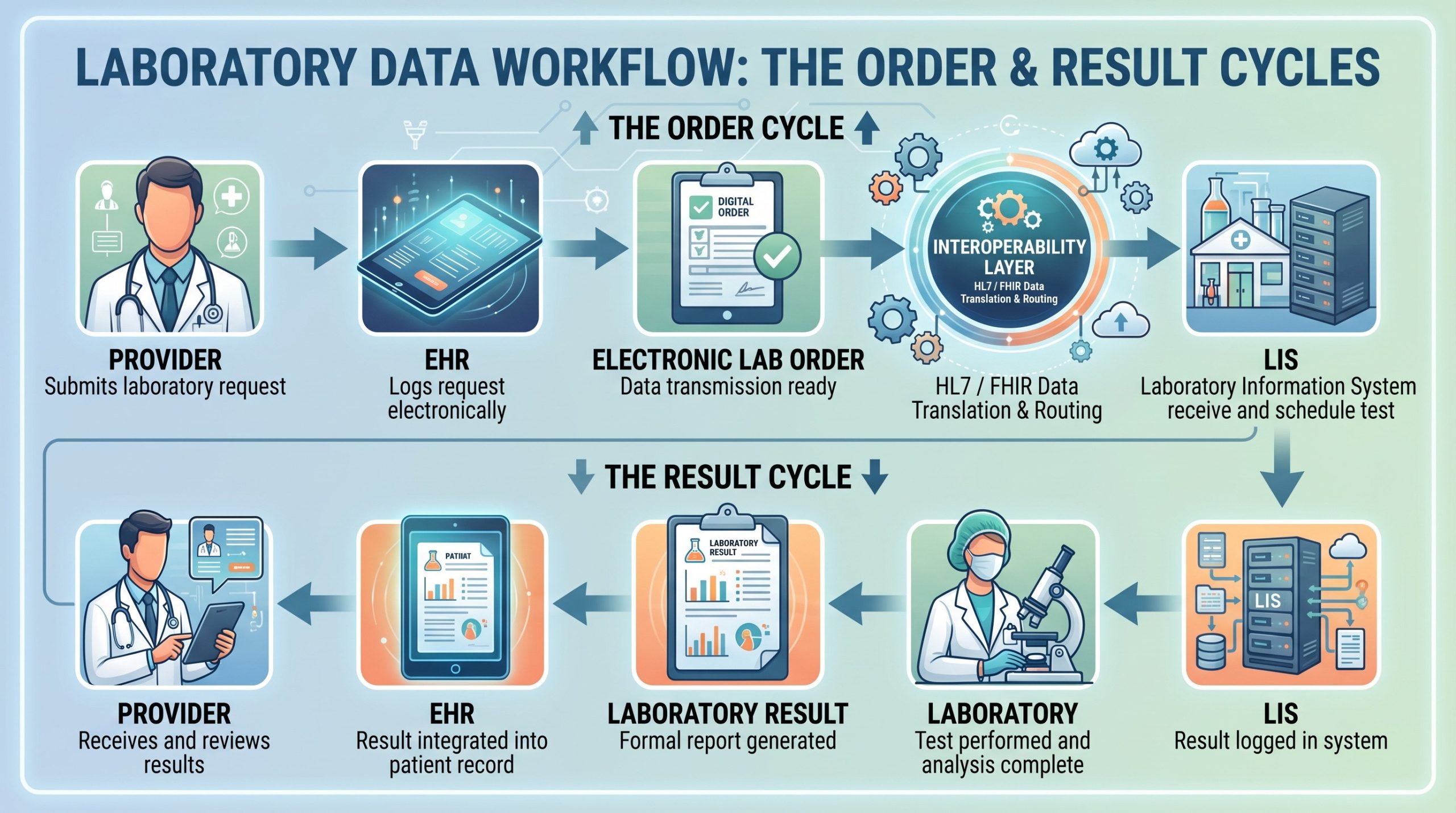
For practices that want lab workflows inside their existing EHR, bidirectional connectivity moves orders out and results back in through a centralized interoperability layer. In practice: provider enters an order in their EHR, the electronic message moves to the interoperability platform, the LIS receives and processes the order, and the completed result routes back the same direction.
The word “bidirectional” gets used loosely in vendor marketing. What matters is confirming the specific EHR version, message type, data fields, and workflow are actually supported before signing anything. A checklist isn’t confirmation.
Provider Portal Access
Not every practice is ready for a direct EHR interface, and some don’t need one. A provider web portal gives authorized staff a browser-based path to lab ordering and results without requiring IT involvement on the provider side.
| Capability | EHR Interface | Provider Portal |
|---|---|---|
| Where provider works | Inside the provider EHR | In a browser-based laboratory portal |
| Orders | Supported electronic interface workflow | Supported portal order workflow |
| Results | Returned to the EHR | Accessed through the portal |
| Best fit | Practices seeking embedded EHR connectivity | Practices using browser-based lab access |
| Can coexist? | Yes | Yes |
Lifepoint Informatics offers portal modules covering results, orders, standing orders, printing, reports, manual results entry, document loading, supply ordering, and branding customization. The portal sits alongside the lab’s existing LIS rather than replacing it, which matters for labs that don’t want to rebuild their core infrastructure around outreach software.
EHR interfaces and provider portals aren’t competing approaches. They serve different practices in the same outreach network. A well-structured program uses both.
LIS Integration
The LIS remains the operational center. Outreach software doesn’t replace it; it connects the external world to it. Evaluating LIS integration means asking specific questions: How are orders delivered? How are results received? How are test codes mapped across systems? How are interface exceptions surfaced?
Compendium changes are a good stress test. When test codes change, or new panels get added, how does that propagate through the outreach platform? Who owns the update process, and what gets tested before it goes live?
Connecting Across Multiple EHR Vendors
Lifepoint Informatics supports more than 500 EHR vendors and over 20,000 established interfaces. That’s not a guarantee every connection is effortless, but it means the complexity is familiar territory. A centralized interoperability hub handles translation between the hospital LIS and external EHR environments, so adding new practices as the network grows doesn’t become a one-off project each time.
HL7, FHIR, and How Data Actually Moves
HL7 remains the most widely used standard for lab orders and results in hospital environments. FHIR, an HL7 specification built for API-based exchange, is gaining traction as more systems support it. Other APIs, secure file transfers, and connectivity methods come into play depending on what the LIS and the provider systems actually support.
The real evaluation question isn’t whether a vendor can list HL7 and FHIR in a feature comparison. It’s whether the platform reliably exchanges the specific data the hospital’s LIS and the provider network require.
Data Mapping and What Gets Lost Without It
Different systems use different test codes, field structures, and message conventions. A centralized interoperability layer handles the translation, mapping codes, identifiers, demographics, and result fields into formats each endpoint understands. The practical questions worth asking: who owns the mapping tables, how are changes tested, and how do exceptions surface when a value doesn’t match? Mapping documentation is usually the first thing to get thin during implementation.
Order Validation and Pre-Accessioning
Structured electronic ordering opens the possibility of catching missing or inconsistent information earlier in the workflow, before a specimen reaches the lab. Depending on configuration, that validation layer checks for required patient information, provider credentials, diagnosis data, insurance information, medical necessity requirements, or test-specific intake questions.
No software eliminates downstream exceptions entirely. But identifying gaps at order entry is less expensive than identifying them at billing.
Insurance Eligibility and Medical Necessity
Eligibility and medical necessity tools support ordering and billing workflows when they’re part of the configured solution. Worth evaluating: when the eligibility inquiry fires, which payers are covered, how unmatched coverage is handled, and how ABN workflows are documented and passed downstream.
These tools don’t guarantee payment. They reduce the volume of avoidable claim denials by surfacing coverage issues before the specimen ships.

Requisitions, Labels, and the Physical Handoff
Electronic ordering connects to a physical specimen. The digital workflow has to print something a phlebotomist can work with. That means evaluating barcode formats, printer compatibility, label content requirements, custom requisition layouts, and how the printed materials stay aligned with the electronic order record.
This part of implementation gets skipped in vendor demos and causes problems at go-live. Ask to see it work.
Multi-Channel Results Delivery
Results don’t always go back the way the order came in. Some practices want structured discrete results in their EHR. Others want PDF reports by secure email or portal access. Some still need fax, and that’s fine.
A mature outreach program handles multiple delivery channels from the same infrastructure. Corrected results, delivery failures, routing rules, and abnormal value flagging need to work consistently across all of them. Ask how each channel handles the edge cases, not just the standard case.
Interface Monitoring
Connectivity problems don’t always announce themselves. An interface that stops passing messages may not trigger any obvious error on either end. Real-time monitoring changes that. Lifepoint’s interface dashboard covers audit tracking, volume monitoring, alerting, and project management, with 24/7 monitoring for its EHR integration services.
What to ask in a demo: what the dashboard actually shows, who gets alerts when something breaks, how long message history is retained, and what the escalation path looks like when a failure requires manual intervention.
Exception Handling
Every healthcare interface environment generates exceptions. Missing required information, unmapped codes, patient matching failures, rejected messages, connectivity interruptions. The question isn’t whether they happen; it’s how clearly the platform identifies them and what the correction workflow looks like.
Ask the vendor to walk through how an exception is surfaced, assigned, corrected, retransmitted, and documented. That workflow is more revealing than any feature list.
Reporting and Analytics
Outreach program leaders need visibility into what’s moving through the network: order volume, result volume, interface traffic, provider activity, operational trends. Basic reporting on those metrics informs staffing decisions, account management, and capacity planning.
If a vendor is proposing AI or predictive analytics on top of that, confirm specifically what data is being analyzed, what the output represents, and how results are validated before anyone relies on them clinically or operationally.
Security and Governance
Lab outreach workflows involve protected health information at every step. Authentication, role-based permissions, encryption, audit logging, vulnerability management, business continuity, and account administration all require direct evaluation rather than general compliance language.
Specific encryption standards, uptime commitments, and audit claims should be confirmed through current vendor security documentation before contracting.
What a Scalable Outreach Program Actually Requires
Growth in an outreach program means more practices, more EHRs, more interfaces, more orders, and more results. Scalability isn’t a feature; it’s a repeatable architecture and operational process for adding new endpoints without rebuilding the integration model each time.
| Point-to-Point Model | Hub-Based Model |
|---|---|
| LIS connects separately to each external endpoint | Multiple external endpoints connect through a centralized interoperability layer |
| Each connection may have separate mapping and monitoring needs | Mapping, routing, and monitoring can be centralized |
| Can work well for limited connection counts | Often considered when the outreach network is broader or growing |
| Still requires maintenance and governance | Still requires endpoint implementation, testing, and governance |
Point-to-point connections work for small networks. As the program grows, a hub-based model, where multiple external endpoints connect through a centralized interoperability layer, reduces redundant mapping and monitoring work. It doesn’t eliminate implementation effort per endpoint, but it makes that effort predictable.
How Lifepoint Informatics Approaches Hospital Lab Outreach
Lifepoint has focused on healthcare interoperability and lab connectivity since 1999. Its current platform combines EHR integration and EMRHub, HL7 Hub, Provider Web Portal, FHIR API capabilities, CPOE Connect, mobile orders and results, and cloud printing into a connected outreach infrastructure.
The value for a hospital lab isn’t any single module. It’s the ability to combine multiple connectivity paths around the existing LIS without forcing every provider practice into the same workflow.
Contact Lifepoint Informatics to discuss how its lab outreach and interoperability solutions support electronic ordering, results delivery, provider portal access, EHR connectivity, and LIS integration across a growing provider network.
Frequently Asked Questions
What is hospital laboratory outreach software?
It’s technology that connects a hospital lab to external providers for electronic ordering, results delivery, and related workflows. The platform sits between the hospital LIS and the outside provider network, handling the translation, routing, and monitoring work that keeps orders moving and results going back out. It doesn’t replace the LIS; it extends its reach.
Does a hospital lab need both an EHR interface and a provider portal?
For most outreach programs, yes. Some practices want lab workflows embedded directly in their EHR. Others prefer a browser-based portal that doesn’t require IT coordination on their end. These aren’t redundant options; they serve different accounts in the same network. A program that only supports one channel will hit a wall when it tries to onboard practices that don’t fit that model.
What’s the difference between HL7 and FHIR in a lab context?
HL7 is the long-established standard for exchanging clinical messages like lab orders and results. FHIR is a newer HL7 specification designed for API-based data exchange, and it’s becoming more common as systems modernize. In practice, most hospital lab environments still rely heavily on HL7 for core ordering and results workflows, with FHIR showing up more in newer integrations and patient-facing applications. A capable platform supports both.
How should a lab evaluate interface monitoring capabilities?
Ask to see the actual dashboard, not a screenshot in a slide deck. Specifically: what message-level visibility does it provide, who receives alerts when an interface goes down, how long activity history is retained, and what the escalation process looks like when a failure requires manual resolution. Real-time monitoring is only useful if someone is positioned to act on what it surfaces.
Can outreach software reduce claim denials?
Indirectly, yes. Eligibility checks and medical necessity workflows built into the ordering process surface coverage problems before a specimen ships. That’s a better position than discovering the issue at billing. But no software eliminates denials. Coverage gaps, documentation requirements, and payer-specific rules introduce variables that technology alone doesn’t resolve. The tools reduce avoidable denials; they don’t eliminate the category.
