Outside laboratories can connect with Epic-enabled provider organizations by exchanging electronic lab orders and results through supported EHR interfaces. The work typically requires coordination across the provider organization, the laboratory, the LIS, the EHR environment, and the integration layer. Lifepoint Informatics supports laboratory interoperability through EMRHub, HL7 and FHIR connectivity, data normalization, translation, project management, interface monitoring, and ongoing support. The exact Epic workflow, message format, testing process, and implementation timeline depend on the receiving Epic organization and its interface requirements.
Epic Lab Integration for an Outside Laboratory
Epic lab integration is the electronic connection between an outside laboratory and an Epic-enabled healthcare organization so supported laboratory orders and results can move between the provider workflow and the laboratory systems.
For an outreach laboratory, the goal is usually straightforward: allow a provider to order laboratory testing within an established clinical workflow, transmit the order to the lab, and return finalized results to the appropriate destination. Behind that workflow, however, several systems may be involved, including Epic, an LIS, an interoperability platform, test compendia, patient and provider identifiers, and organization-specific interface rules.
Lifepoint Informatics provides a hub-based interoperability model that can connect laboratory systems with many EHR environments. Lifepoint publicly lists Epic among the EHR systems it supports and describes uni-directional and bi-directional EHR interface products, data normalization, compendium management, interface monitoring, project management, and 24/7 support.
Why Outside Lab-to-Epic Integration Can Be Complex
An outside laboratory is not simply connecting to “Epic” as one universal endpoint. Each implementation is coordinated with a specific healthcare organization and must reflect that organization’s approved workflows, identifiers, compendium, interface specifications, security requirements, and testing process.
That makes implementation a data-governance and workflow project as much as a messaging project. The integration team must determine what information is sent, how it is represented, how orders and results are matched, how exceptions are handled, and how the interface will be monitored after go-live.
- Order and result workflows must match the receiving organization’s requirements rather than assuming one universal Epic configuration.
- Laboratory test codes and the receiving organization’s orderable/resultable definitions may require mapping and translation.
- Patient, provider, facility, specimen, order, and result identifiers must be handled consistently across systems.
- Interfaces require coordinated testing before production use, including expected and exception scenarios.
- Ongoing monitoring matters because a technically successful go-live does not eliminate future message, mapping, connectivity, or workflow exceptions.
How an Outside Lab-to-Epic Workflow Works
A typical bidirectional laboratory workflow can be represented as:
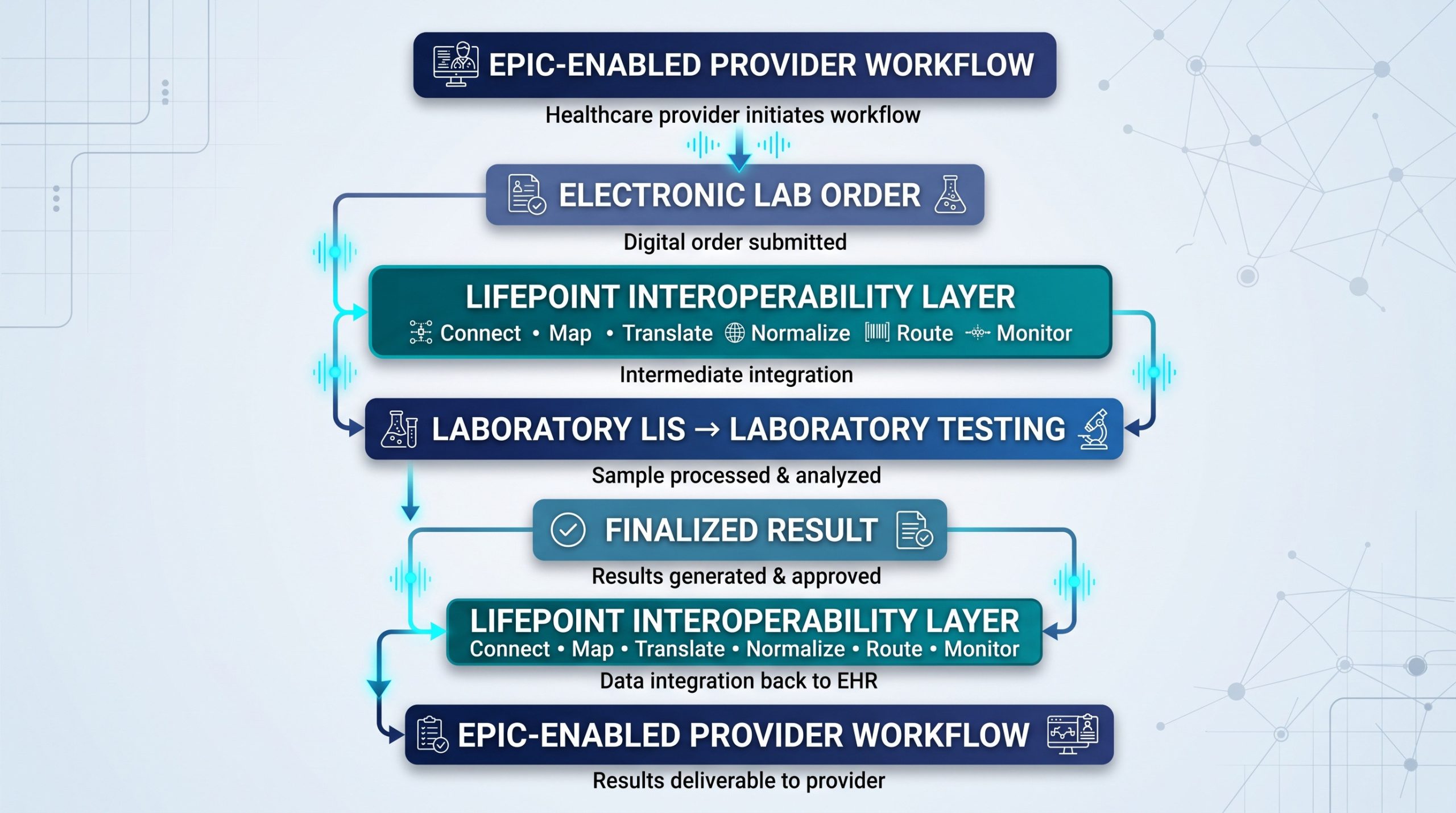
The exact transaction type and destination vary by implementation. Some organizations use HL7 v2 messaging, while others may use FHIR APIs or additional supported formats. Lifepoint’s public materials describe support for HL7, FHIR, JSON, CCDA, CCD, EDI, XML, and other formats through its interoperability solutions.
Define the Ordering Workflow
The first question is not which message type to use. It is what the provider needs to accomplish. The project team should define where the order originates, which data elements are required, how the test is represented, whether specimen information is included, and how the order reaches the laboratory LIS.
For bidirectional laboratory integration, Lifepoint describes electronic order transmission within the EHR environment as part of its EHR interfacing capabilities. The implementation should still be validated against the specific Epic organization and laboratory workflow before publication or deployment.
Align the Laboratory Test Compendium
Compendium alignment is one of the most important parts of lab integration. The ordering system and laboratory may use different codes, names, panels, components, specimen requirements, or local conventions for the same test. An integration layer can help maintain translation rules so the receiving LIS gets the information in the expected form.
Lifepoint publicly identifies compendium management and translation services as part of its EHR integration offering. That capability is more defensible than claiming a universal Epic-specific EAP mapping method for every implementation.
Normalize and Route the Electronic Order
Once the order is created, the interoperability layer can normalize and translate supported data before routing it to the laboratory. This reduces the need for the LIS to accommodate a different inbound structure for every connected provider system.
Normalization does not mean every order becomes error-free or that manual work disappears. Missing information, mismatched identifiers, unsupported values, connectivity problems, and workflow exceptions can still require review. A well-designed integration makes those exceptions easier to identify and manage.
Return Finalized Results to the Provider Workflow
After laboratory testing and result verification, the LIS sends the supported result data to the integration layer. The data can then be translated and routed according to the receiving organization’s interface specification. Depending on the implementation, result delivery may include discrete data, formatted reports, or other supported result formats.
Lifepoint’s EHR integration materials describe flexible result formats and uni-directional and bi-directional interfaces. The exact Epic filing location, In Basket behavior, flowsheet behavior, PDF handling, and component mapping should be confirmed with the receiving Epic organization rather than stated as universal behavior.
HL7, FHIR, and Epic Lab Integration
HL7 v2
HL7 v2 remains widely used for clinical interfaces, including laboratory orders and results. An implementation may use order and result message structures appropriate to the organizations involved, but the exact version, trigger event, segments, required fields, acknowledgments, and local conventions are implementation-specific.
FHIR
FHIR is an HL7 standard designed around modern web-based exchange. It can support laboratory-related resources and API workflows, but FHIR does not automatically replace HL7 v2. Healthcare organizations frequently operate mixed interoperability environments, so the integration approach should match the endpoint and workflow actually available.
Why the Integration Layer Matters
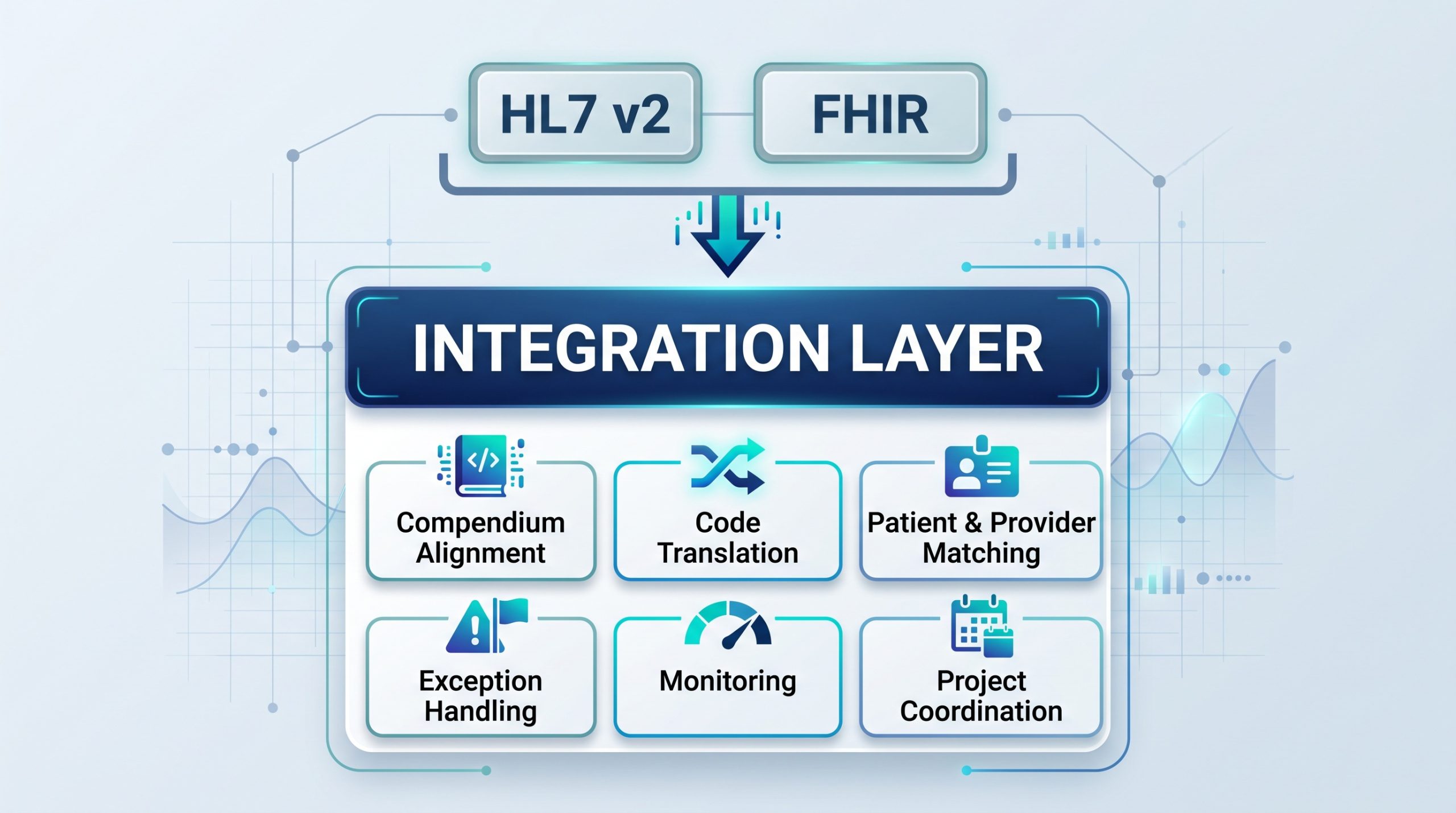
Neither HL7 nor FHIR by itself solves compendium alignment, local code translation, patient and provider matching, exception handling, monitoring, or project coordination. Those operational responsibilities are where an interoperability platform and experienced integration team add value.
Point-to-Point Integration vs. a Hub-Based Model
| Consideration | Point-to-Point Model | Hub-Based Model |
|---|---|---|
| Connections | Individual interfaces are maintained between systems. | A centralized interoperability layer manages connections between the lab and multiple external systems. |
| Mapping | Rules may be maintained separately for each interface. | Mapping and translation can be managed through a centralized integration workflow. |
| Scaling | Each new connection can add another integration relationship to maintain. | A hub can simplify expansion across multiple EHR environments. |
| Monitoring | Monitoring practices depend on each interface and internal tooling. | Centralized dashboards and alerts can support interface oversight. |
| Implementation | Requires coordination among the lab and each receiving organization. | Still requires coordination and testing, but the integration layer can standardize repeatable work. |
What Lifepoint Informatics Publicly Supports
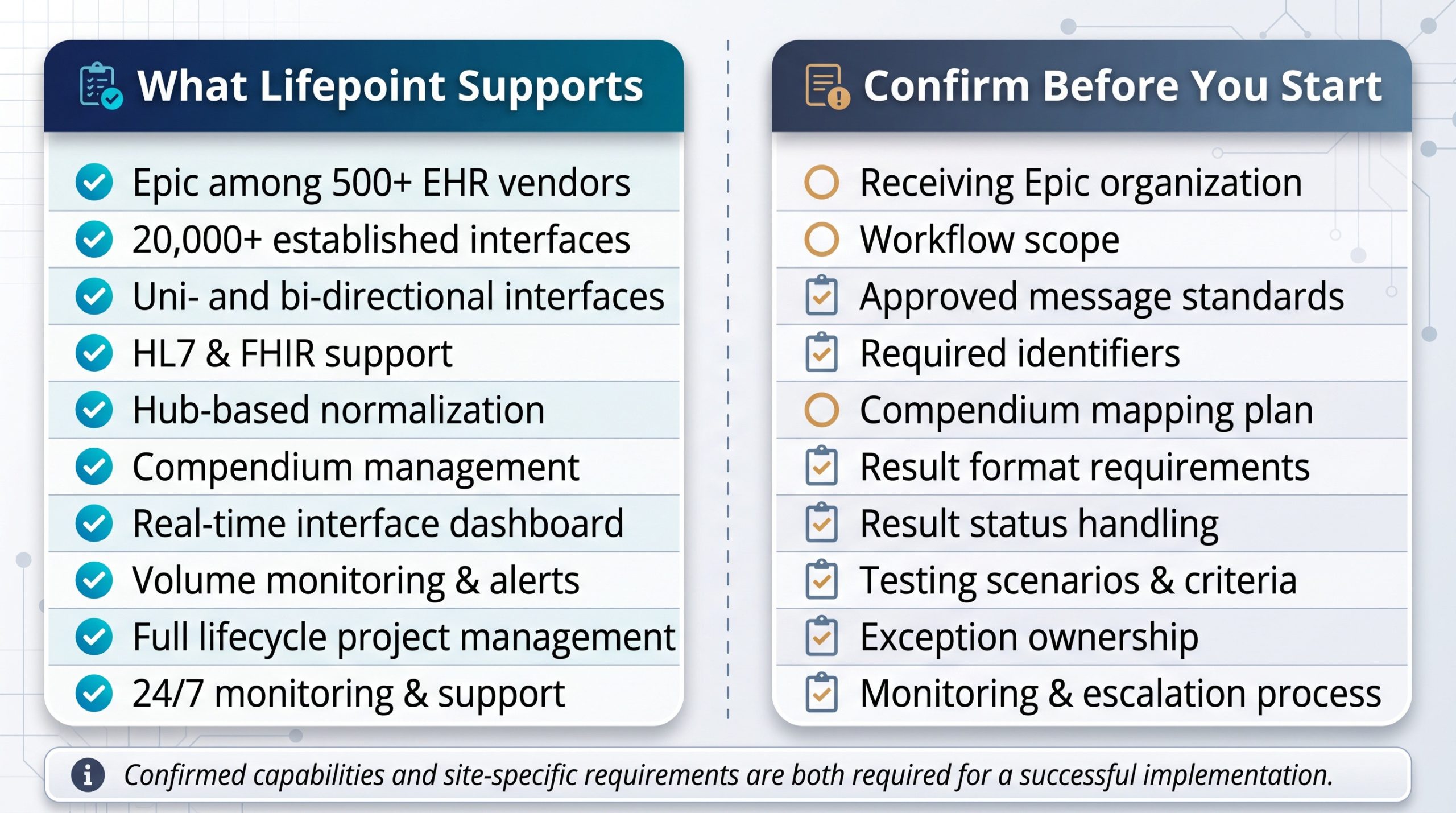
Lifepoint’s current public materials provide a strong foundation for an Epic integration article without relying on unverified Epic-specific product claims. Published capabilities include:
- Epic listed among supported EHR systems.
- More than 500 supported EHR vendors and 20,000 established interfaces.
- Uni-directional and bi-directional EHR interface products.
- HL7 and FHIR support, along with additional healthcare data formats.
- A hub approach that centralizes connections and normalizes data.
- Compendium management and translation services.
- Real-time interface dashboard capabilities with audit tracking and monitoring.
- Interface-volume monitoring and configurable alerts for issues.
- Project management across the integration lifecycle.
- 24/7 interface monitoring and support.
Those claims should be used carefully: a large interface library and broad EHR experience do not mean every Epic organization can be connected without local coordination, validation, or implementation work.
What an Outside Lab Should Confirm Before an Epic Integration Project
- Which Epic organization or provider group is the receiving endpoint?
- Is the desired workflow orders only, results only, or bidirectional?
- Which message standards, versions, APIs, and transport methods are approved?
- What patient, provider, facility, order, specimen, and result identifiers are required?
- How will the laboratory compendium be mapped and maintained?
- Are discrete results, formatted reports, or both required?
- How are corrected, amended, preliminary, canceled, and final results handled?
- What testing scenarios and acceptance criteria must be completed before go-live?
- Who owns exception management after launch?
- What monitoring, alerting, escalation, and support processes will be used?
Epic Integration and Manual Lab Work
No integration should be described as eliminating every manual step or every error. Electronic ordering and result delivery can reduce reliance on re-keying and disconnected workflows when properly implemented, but exceptions remain part of healthcare interoperability. The better objective is to reduce avoidable manual transcription, standardize data exchange, surface exceptions, and create a maintainable process for resolving them.
How Lifepoint Supports Epic-Related Laboratory Connectivity
Lifepoint Informatics has focused on healthcare interoperability since 1999. Its public materials specifically reference Epic and describe Lifepoint as an aggregator that can connect multiple provider EMR systems through a single LIS interface. Lifepoint also describes normalizing inbound orders, sending laboratory data in a consistent format, and configuring LIS interfaces for updates and results back to Epic.
For outside laboratories, that positions Lifepoint as the interoperability layer and project partner rather than as a replacement for Epic, the laboratory LIS, or the receiving organization’s interface team.
Frequently Asked Questions
Can an outside laboratory send electronic orders and results to Epic?
Yes, when the receiving Epic organization supports and approves the required interface workflow. The exact architecture, message format, testing requirements, and implementation process depend on that organization and the laboratory systems involved.
Does every Epic lab interface use the same HL7 specification?
No. HL7 provides a standard framework, but organizations can have different versions, required fields, identifiers, code sets, workflows, and local implementation rules.
Does Lifepoint support Epic?
Lifepoint publicly lists Epic among the EHR systems supported by its interoperability solutions and describes Epic-related laboratory integration workflows on its website.
Can Lifepoint support bidirectional laboratory interfaces?
Lifepoint publicly offers bidirectional EHR interfacing for laboratory integration, including electronic order transmission and result delivery. Exact functionality should be confirmed for the specific Epic organization and LIS.
Is FHIR replacing HL7 v2 for Epic lab integration?
Not necessarily. FHIR is an HL7 standard and can coexist with HL7 v2. The right method depends on the endpoint, available APIs, existing interface architecture, and workflow requirements.
How long does an Epic laboratory interface take to implement?
There is no universal timeline. Timing depends on scope, stakeholder availability, interface specifications, compendium complexity, security and connectivity requirements, testing, and the receiving organization’s implementation process.
Building a Maintainable Epic Lab Integration Strategy
Successful Epic laboratory connectivity is not about forcing every provider organization into one technical template. It is about creating a repeatable integration model that can accommodate organization-specific requirements while giving the laboratory a consistent way to connect, map, translate, route, monitor, and support data exchange.
For laboratories that need to connect with Epic-enabled organizations while also supporting other EHR vendors, a hub-based interoperability strategy can reduce the complexity of managing many separate connectivity relationships. Lifepoint Informatics combines EHR integration, HL7 and FHIR connectivity, compendium management, project management, monitoring, and support to help laboratories build that model.
To discuss an Epic-related laboratory integration project, contact Lifepoint Informatics to review your LIS, provider connectivity requirements, interface scope, and implementation needs.